
Contributions Tab - Families
The Contributions Tab provides a snap-shot of the family's giving record over a 5 year period and a view of the current contributions listed for the family to date.
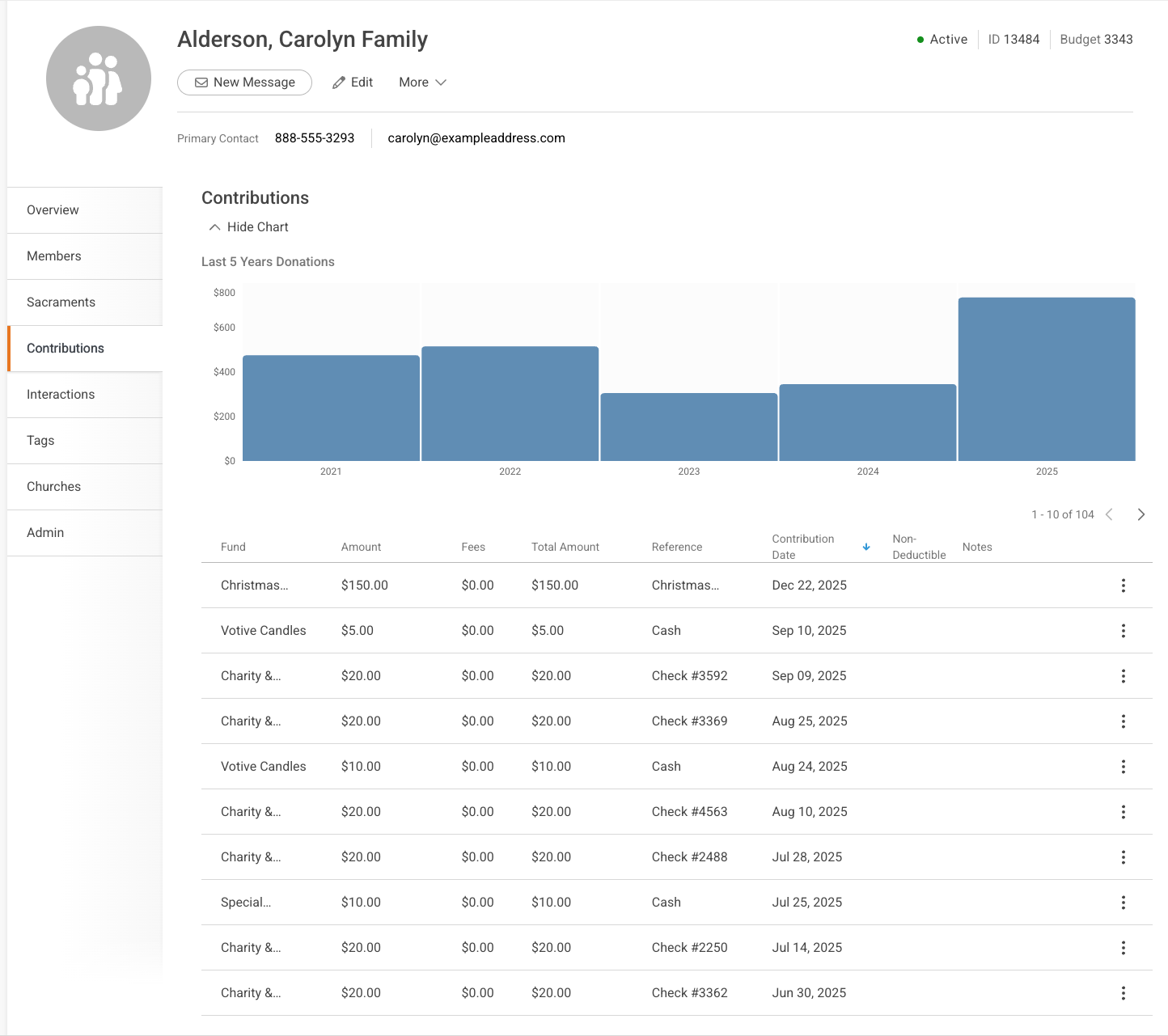
Click the 3-dot button to view the Contribution options.

View Contribution

Edit Contribution

How to Edit Contributions in the Family Record
- Select the Contributions tab.
- A list of the contributions associated with this family displays.
- Find the contribution you would like to edit and on the right side, press the ellipses button.
- The options on the far right are: View | Edit | Audit | Delete.
- View displays the contribution details.
- Edit allows you to make changes to the contribution, including the fund information.
- Audit displays the history of this contribution.
- Delete allows you to to delete the contribution.
- The Edit Contribution dialogue box displays.
- The options on the far right are: View | Edit | Audit | Delete.
- Change the contribution information.
- Press Save to record your changes.
Audit Contributions
The Audit selection displays the transaction history for this contribution record. Each time a contribution is edited, the change is recorded and timestamped for a complete audit trail.
Delete Contributions
It does what it says. Be sure you want to delete a contribution from a family record.