
The Data Retriever
|
|
The ChMS Data Retriever is an AI tool that works behind the scenes to help answer the questions you ask in natural language—basically the way you’d speak or write. It takes your question and converts it into a complex database query so the system can find the right information. |

Depending on what you’re looking for, the Data Retriever will target the relevant data in your database, pull from the appropriate sources, and bring everything together into one clear, presentable format.
Who Can Use the Data Retriever?
At this time the Data Retriever is available to everyone with a Church Admin role in the ChMS system.

Asking a Question
Ask the Data Retriever for information that you might normally pull from the Explorers (Family, Member, Group, etc.) You might try one of the example questions to get started.
Example:
Show me a list of all parishioners who were baptized within the last 12 months.

Once you see your results, you can use the Download link to save them as a CSV or XLS file. If you’d rather, you can also copy them to your clipboard and paste them right into a document. There are plenty of options to help you get the custom experience you want.
Come Back Often
If you ask a question and you like the results, you can easily save it with a bookmark. Then, anytime you want to see updated information for that same question, just pick it from your Favorites list. You can also go back and review earlier questions anytime in your History list.
Providing Feedback
When you feel like the Data Retriever gave you great service, or you have ideas for an enhancement, please use the Thumbs Up or Down feedback icons. It’s an easy, direct way to share what you’re thinking about the Data Retriever. We review every submission, so you can feel confident that we’re paying close attention to your feedback.
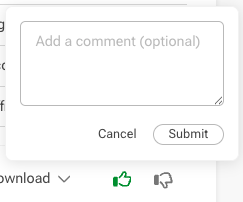
If you notice any inaccuracies or run into other issues, please select the Thumbs Down and add a brief description of what went wrong. This helps us figure out where the issues are faster.