
Overview Tab - Families
The Overview Tab gives you a high-level view of the family's pertinent information. It is meant to be a quick, at-a-glance summary of the family.

Let's break it down into modules:
Family Contact Info
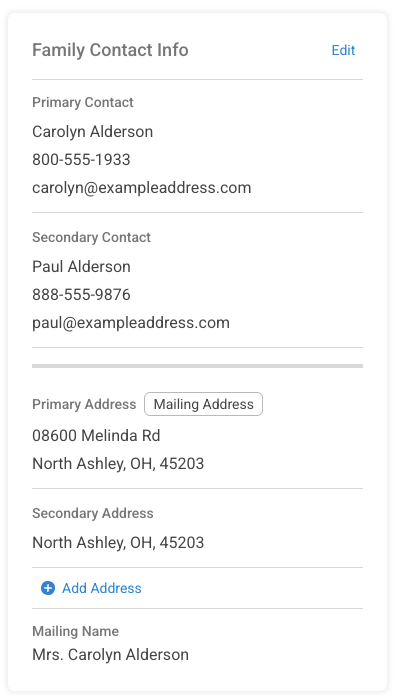
Edit Member Information
Use the Edit link to make changes to the contact information for a family record. You can identify the primary and secondary contacts for the family and toggle notification settings here for the members list.
You can also go directly to each member's profile by using the 3-dot button to the right side of their listing.
Need to add a new family member? Just click on the +Add a Member link in the lower left corner.
The list allows you to sort by the member's status.
Edit Address Information
Select the Address option to view the addresses on file for the family. The primary address is the address on the family record. If there is a Secondary Address listed, it will be displayed as well. You can now add a tertiary address for special circumstances. You can enter a start and end date for the secondary and tertiary addresses for seasonal parishioners.
The ChMS "official" mailing address will be identified by the Mailing Address indicator. This mailing address has been verified by the USPS as an approved address for all domestic mailings. See Mailing Address Tab for more information.
Members
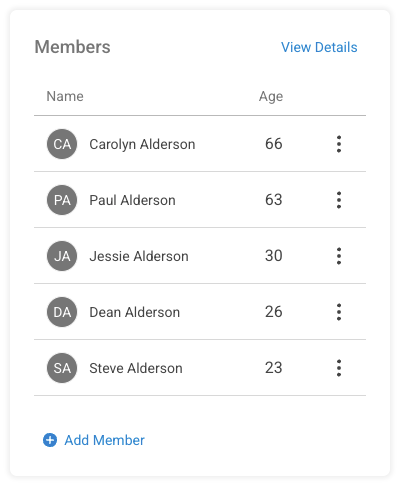
The Members Module allows you to navigate directly to the members list for the family or quickly add a new member. To make modifications to a specific member's record, use the 3-dot button to the right.

Latest Sacraments

The Latest Sacraments Module displays the most recent records of sacraments received by the family members. You can add a new sacrament right here or click View All to go to the full sacrament list tab for the family.
Funerals are now listed as a part of the sacramental records.
Latest Interactions

A brief display of the most recent family interactions. Use the +New Interaction to make a new entry or click View All to go to the Interactions tab.
Tags

If you are using Family Tags to categorize your family records, you will see a list here of any that apply to your family. Use the +New Interaction to make a new entry or click View All to go to the Tags tab.
Admin

Use this module to quickly add reference information such as Budget (Envelope) Number, Registration Date, Contribution Method, and more. Use the View All link to go to the Admin tab of the family record.
Notes

This is a great place to jot notes to other Church Administrators about things that have been recorded for the family. It's a working notepad that will grow as you need. Use Edit to add more to the note. Delete. Well, it deletes the note.
Churches

This important little module displays the list of all the parishes in your diocese where the family has been active. The current parish of register is identified by the Registered indicator and the Status indicator (green dot) shows where the family is considered Active.